

You’ve done the right thing and put a proper cookie banner on the site. A few weeks later you open Google Analytics and your conversions have fallen off a cliff. The phone’s still ringing, though. At least you think it is.
This one catches people out more than it should. It’s caught us out too.
What happened on our sites
On a couple of sites we took live, the previous set-up had no proper cookie consent. Analytics was tracking pretty much everyone who landed on the page, whether they’d agreed or not.
When we launched the new sites, a cookie consent banner went in as part of the build. It’s included in our hosting. Once it was live, Google Analytics only recorded visitors who accepted. Everyone else was left out.
So conversions in Google Analytics dropped.
One of those sites was HolidayHost, a holiday-home management company. The new site was better set up for conversions than the old one and recorded real results more reliably. The old site had not tracked conversions in the same way, so we were comparing two different things. The banner also put the site on a proper consent footing.
It took us a while to link the drop to the banner.
Why a banner makes Google Analytics numbers fall
Google Analytics works by placing cookies and reading information on a visitor’s device. In the UK, that generally needs the visitor’s agreement first. A banner asks. Some click accept. Plenty click reject or just ignore it.
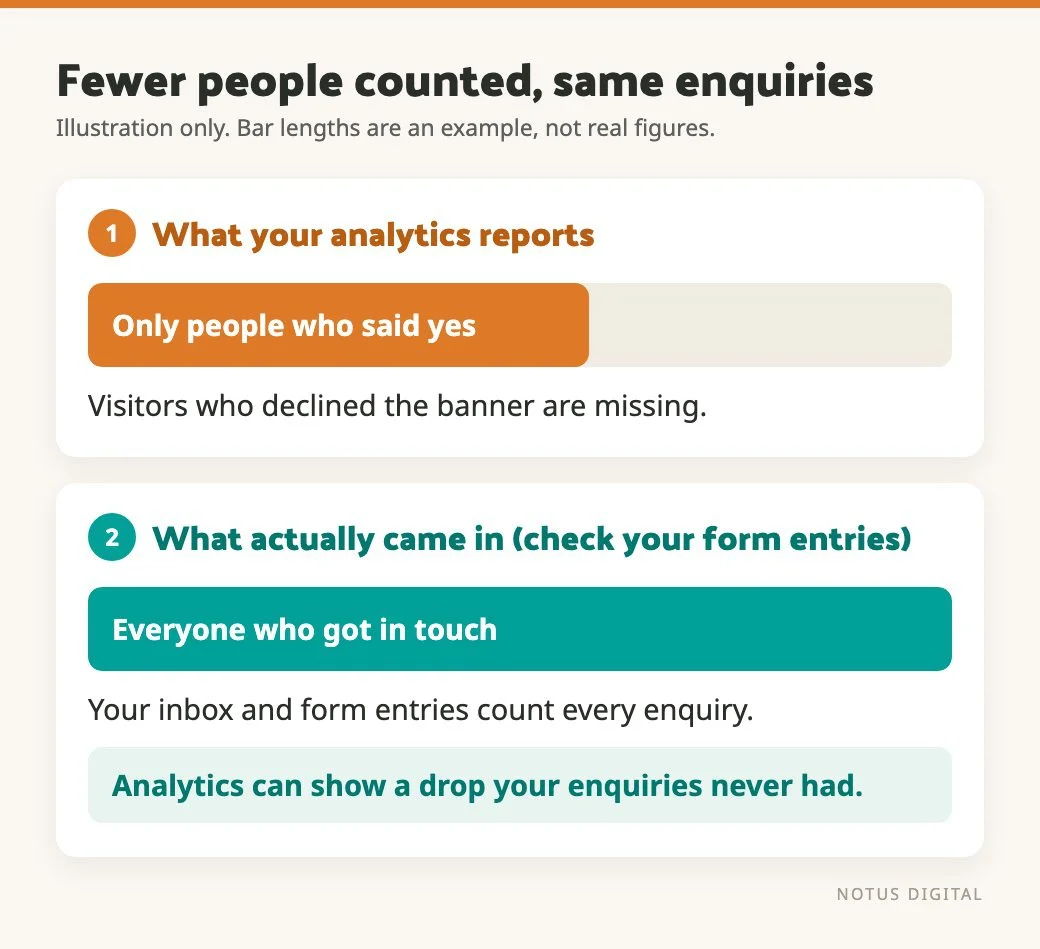
Only the accepters are counted. Everyone else is invisible to your normal Analytics reports, including the ones who went on to fill in your form.
That’s the bit that surprises people. Your enquiries could be exactly where they were. What has shrunk is how many of your visitors Analytics can see. So if you hold an old period, when everyone was counted, up against a new one, when only the people who said yes are counted, the new one will look worse.
Do you need a banner for analytics?
Probably, yes. But the rules have shifted a little, so here is where things stand.
The ICO updated its guidance on storage and access technologies in 2026, after the Data (Use and Access) Act 2025. You can read it on the ICO page.
The update includes an exception for statistical purposes. If the only reason you are using the technology is to collect aggregate statistics about how your service is used, so you can improve it, you may not need consent.
It is narrow, though. You must keep the data aggregated and not keep individual-level information once it has been processed. You must give clear information and offer a simple, free way to object. Any third party can only act as a processor helping you improve your own service. It can’t use the data for its own purposes or link it to other services. Tracking individual visitors, advertising and profiling are outside the exception.
A typical Google Analytics set-up that links to other Google services probably doesn’t meet those conditions. Most sites will still ask for consent. We still do.
We aren’t lawyers. If you are unsure, read the ICO page or ask someone qualified.
How much Google Consent Mode can get back
Google Consent Mode is how your banner tells Google’s tags what the visitor chose. Google’s own guide to setting up Consent Mode explains how it works on a website and the difference between the two modes. It won’t tell you how your own site is set up, though. It comes in two main flavours.
- Basic: Google tags don’t load or send anything until the visitor accepts. If they decline, nothing is recorded.
- Advanced: the tags load anyway and send cookieless pings when a visitor declines. Google then uses modelling to estimate behaviour and conversions for those visitors, based on the ones who did accept.
Advanced mode can claw back some of what you lose. But what you get back is an estimate, worked out from the people who did accept. And modelling in GA4 needs enough data before it switches on, so a small site may not get much from it. You will see vendors quoting big recovery figures. Ignore those and read Google’s own documentation for the current requirements.
If you are setting this up or checking it, the useful question is which mode your tags are running in. It depends on how your banner and your tags are wired together, so ask whoever built it.
How to count real enquiries instead
Google Analytics can only tell you about people who consented. For enquiries, there is a more reliable count.
If your forms run on Gravity Forms, the entries in your WordPress database are a count of nearly everyone who submitted, within your retention period. No consent step sits between you and those numbers.
There are two catches.
- The old site may not have counted the same way. If it had no form tracking, or a different form plugin, you are comparing different things. The best check is your own inbox and phone. Did real enquiries drop, and were they the kind you want?
- Spam. Some of the old numbers were probably junk. We use CleanTalk for spam protection. It works in the background, so visitors don’t have to solve a puzzle to send a form. If your enquiry count dropped when spam protection improved, that is good news.
What to check first when conversions drop
In the order we would do it:
- Is it seasonal? Did the same thing happen at this time last year? One month against the previous month proves very little.
- Has anything changed on the form or the page? More fields, a different button label, the form moved lower down, social proof removed. Any of these can cost you enquiries.
- Less often: has the cookie consent set-up changed? Check whether the drop starts on the day the banner changed.
If none of these explain it, that is the point where a proper conversion audit earns its keep. When we do conversion work for a client, heatmaps and recordings show us how people actually move through the page, and where they stop. You can read more on our conversion rate optimisation page.
If you are about to change your cookie banner
Tell whoever looks at your numbers before you switch it on. Mark the date in your reporting. Expect a step down in Google Analytics that has nothing to do with how your site is performing. And keep a second source of truth, like form entries or phone calls, so you are not relying on one tool that has just changed the rules.
If you run a business near us in Bognor Regis and want someone to look at your numbers with you, get in touch.
The cookie consent questions people ask
Most sites still ask for consent. The ICO’s updated guidance includes a narrow exception for aggregate statistics, but a typical Google Analytics set-up that links to other Google services probably doesn’t fit it. We aren’t lawyers, so check the ICO guidance for your own situation.
Analytics only records visitors who accept. Visitors who decline, or ignore the banner, drop out of your reports. Your real visitors and enquiries may not have changed at all.
It is how your cookie banner tells Google’s tags what each visitor chose. In basic mode, tags send nothing until the visitor accepts. In advanced mode, they send cookieless pings when a visitor declines, and Google estimates the missing conversions using modelling.
Not exactly. Advanced consent mode can estimate some of what is missing, but those figures are modelled, and GA4 needs enough data before it applies. The better move is to treat the date of the change as a reset and use form entries as your cross-check.
Use the source that sits behind the form. With Gravity Forms, the entries stored in WordPress count nearly everyone who submitted, within your retention period. Check for spam, and ask yourself whether the enquiries were genuine.