

Most rankings lost in a website move are self-inflicted. Nobody means to do it. A page address changes, nobody sets up a redirect, and Google turns up at the old address to find a dead end where a perfectly good page used to be.
This post is about the move itself: a live site with people logged in, heading to a new server, and the slightly nervy day the domain gets pointed at it. If you’re still deciding what the new site should look like, start with how to plan a website redesign without losing your SEO and come back here when you’re ready to switch.
Which kind of move is yours?
First, work out what’s actually changing. It decides how much SEO risk you’re carrying.
Just a new server. The address of every page stays the same. Only the machine that serves it changes. Done properly, search engines barely notice. This is the lowest risk move.
A redesign or rebuild. Some page addresses change, pages merge or disappear, or the domain itself changes. This is where rankings get lost.
Plenty of moves are a bit of both. Be honest with yourself about which pages are changing.
Start by finding the pages that earn you traffic
Before the move, collect three things.
- A crawl of the current site. A crawler such as Screaming Frog, which is free up to 500 URLs, lists every URL, its title, its meta description and its status code. Save it. It’s your record of how things were.
- Your top pages in Search Console and analytics. Look at which pages get clicks and which get visits. Those are the ones you protect first. A page nobody visits can usually go quietly.
- The keywords you already rank for. Export the queries from Search Console, plus any keywords you track in a rank tracker.
If you only do one, do the second. It feeds the sweep further down.
Keep the URLs that work
If /services/web-design/ earns traffic, give the new site the same address if you can. Changing a URL only because the new design has a different menu is a common way to make extra work and extra risk for no benefit.
Where an address has to change, it needs a redirect.
Build a redirect map
A redirect map is a plain spreadsheet. One column for the old address, one for the new one. Every old URL that earns traffic or has links pointing at it goes in, with the single best new page beside it.
Some rules we stick to:
- Use permanent (301) redirects.
- Each redirect should land on the final page in one step. No hopping from old to old to new. Chains slow things down, and Google may stop following a long one.
- Send each old page to the closest matching new page. Dumping everything on the homepage doesn’t help. Google may treat those redirects as soft 404s, and visitors land somewhere that doesn’t answer what they came for.
- If a page truly has no equivalent, it’s fine to let it go. Don’t invent a match just to fill the cell.
- Keep the redirects in place for a long time. A year is a sensible minimum.
The order we followed for Gentle Recovery
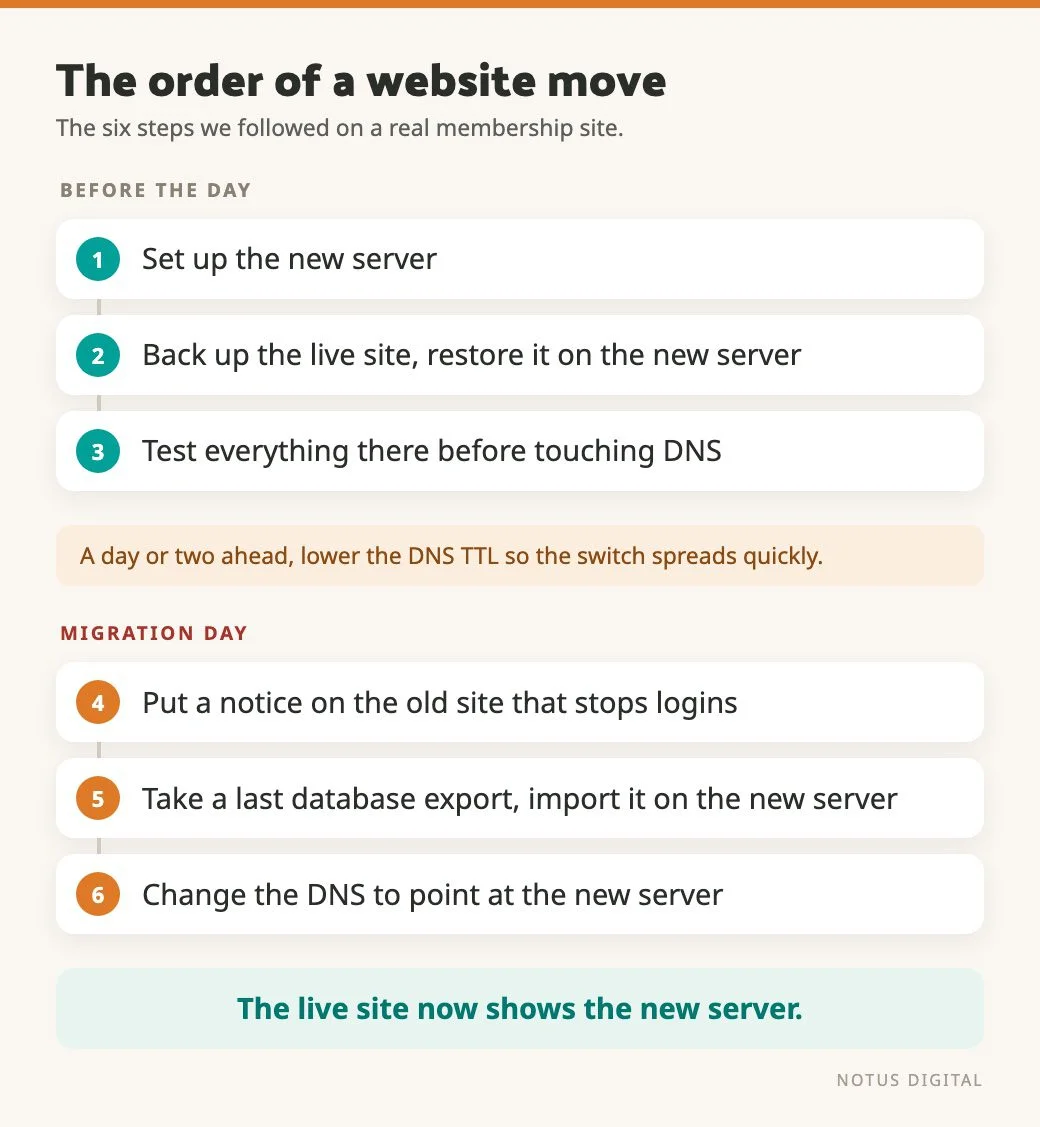
Gentle Recovery is a membership site. We moved it to our own server, and the members and their course progress had to come across properly. Here’s the order we followed.
- Set up the new server.
- Take a full backup of the live site and restore it onto the new server.
- Check everything works on the new server before touching DNS. Make any small fixes there, away from the public.
- On migration day, put a notice on the old site that stops people logging in while the move happens.
- Take one last export of the database, with every user and everything they’ve done, and import it on the new server.
- Change the DNS to point at the new server. The live site then shows the new one, working.
If you’re doing this yourself, lowering the DNS TTL a day or two before helps the switch spread quickly.
Step 3 is the one worth taking slowly. Anything you test before the switch is something you won’t be fixing live in front of your visitors.
The login freeze lasted about half an hour, in the daytime. We picked the time from the login data, looking at when members actually logged in and choosing the quietest window. If your site has logins, orders or bookings, look at your own data the same way before you choose a time.
The public pages kept their addresses. We checked they stayed the same after the move, so for the part of the site Google sees, this was the low-risk kind of move. One part did change address, though.
When part of a site moves to a subdomain
On Gentle Recovery, the members area used to sit in a /members/ folder on the main site. It now lives on a members subdomain. We prefer a subdomain for a members area, and it keeps the members’ analytics somewhat separate from the public site’s.
A change like that brings a few jobs with it. Here’s how we handled each one, and what to check if you’re doing something similar.
- Old addresses still need somewhere to go. Members may have had the old
/members/links bookmarked, saved in emails or typed from memory. We set up redirects from those old addresses to the members subdomain. On your own move, send each old address to its matching page on the subdomain, in one step, the same as any other changed URL. - Decide how analytics should treat it. You can give the subdomain its own analytics property, or keep it in the same one as the main site. Both are valid. Pick one on purpose, and check the numbers look sensible on both sides after the switch.
- The consent banner has to cover the subdomain too. On Gentle Recovery it does. If you move a section to a subdomain, check your banner loads there, and whether a choice made on the main site carries across or visitors get asked again.
- Search Console didn’t need a separate look here. Members only reach the subdomain after joining and logging in, so nothing on it is meant to be found in search. Google can’t see behind a login anyway. So the SEO risk on this part of the move came down to redirects and links.
That last point depends on the section being private. If the part you move to a subdomain is public, it needs its own checks. A domain property in Search Console covers subdomains. A URL-prefix property for the main site doesn’t, so you’d want to add the subdomain and watch it the same way you watch the main site.
The checks that catch the silly stuff
These are worth doing on any move, whoever’s doing it. Each takes a minute. Missing one can cost you months.
- Staging is still blocking search engines. Test sites are often set to discourage indexing. If that setting travels with the site to the live address, Google is told to keep out. In WordPress it’s a tick box under Settings, Reading. Check it on launch day.
- A
noindextag or a restrictive robots.txt came along. Openyourdomain.co.uk/robots.txtand look for aDisallow: /line. View the source of a few key pages and search fornoindex. - Titles and meta descriptions didn’t come across. A rebuild often resets them to defaults. Compare the new site against the crawl you saved.
- Analytics and tracking are missing. If the tag isn’t on the new site you won’t see the dip, or the recovery.
- The sitemap is wrong or missing. The new site should publish a sitemap listing the pages you want indexed. Submit it in Search Console.
- Internal links still point at old addresses. They work through the redirect, but they should point at the final URL.
- Canonical tags point at the wrong domain. Easy to miss after a domain change.
- HTTPS isn’t working properly. Check the padlock on every key page and that the
http://version redirects tohttps://.
The keyword sweep before switch-over
If the new site has a new structure, take every keyword you track and run it against that structure before you switch. For each one, ask: which page on the new site is meant to answer this? Does that page exist? Does it say the thing the query is asking about?
Then go through every page that earns traffic and confirm it either keeps its address or has a redirect. Check each redirect arrives at its destination in one step.
The sweep does two jobs. It shows you any keyword that has lost its home in the new structure, while you can still fix it. And it gives you a short watch list of the pages most at risk in the first weeks. Usually that means any page whose address changes, and any page that is now taking traffic from old pages merged into it.
What to do on switch-over day and after
Once DNS is pointing at the new site:
- Click through the top pages and the redirects yourself. Don’t take it on trust that they work.
- Run a crawl of the live site and compare it to the one you saved. Look for 404s, redirect chains and missing titles.
- Submit the new sitemap in Search Console. Search Console also has a Change of Address tool, which is for moving a site to a new domain. We didn’t need it on Gentle Recovery. The domain stayed the same, and only the members area moved to a subdomain. A server move on the same domain doesn’t need it either.
- Inspect your top few URLs in Search Console to check Google can fetch and index them.
- Keep an eye on your watch list.
For the first four weeks, check Search Console for new crawl errors and for sudden drops on your most important pages. Compare against your saved top pages from before. A small wobble is normal while Google works through the new site. A page that falls and stays down usually has a specific cause, such as a missing redirect, a changed title or a noindex tag, and you can find it.
Ask for the right things before a move
If someone else is doing the move for you, or you’re bringing in a new developer, make it easy for them. We always ask for:
- Domain and hosting details.
- Access to the website itself, so we can see how it’s put together.
- Hosting and login access, so we can see the code.
- A handover from the last developer, if possible.
On Gentle Recovery the previous developer did give us a handover. It explained the background and the problems they’d already run into. That saved us time, because we could fix things faster and didn’t have to rediscover them.
If you’re moving soon
The short version: a list of the pages that matter, a redirect for anything that changes, a check of the settings that block search engines, and a calm order of steps to follow on the day. If you’d like a second pair of eyes before you flip the switch, get in touch. The website launch checklist covers the final pre-launch checks, and technical SEO basics explains sitemaps, crawling and indexing in more detail.
Questions people ask before a website move
Open Search Console and go to the Performance report, Pages tab, with the date range set to 12 months. Then check your analytics for the pages that get visits and the ones that lead to enquiries. Add any page that other sites link to. That combined list is the set you protect. Everything else is lower priority.
It’s a spreadsheet that pairs each old page address with the new address that replaces it. Your developer uses it to set up permanent (301) redirects, so visitors and search engines who ask for the old page land on the right new one. Check it before launch and test a sample of it after.
Not necessarily. Every URL that earns traffic, has links from other sites, or is likely to be bookmarked should. Pages that never had visitors or links can often be removed without a redirect. If an old page has no equivalent on the new site, let it return a 404 rather than redirecting it to something unrelated.
It varies. If the addresses stayed the same and the content is similar, there’s often little visible change. If addresses or content changed a lot, expect some movement while Google works through the new site, and give it a few weeks before you judge it. If a key page has dropped and stays down, look for a specific cause rather than waiting.
Check Search Console for crawl errors and indexing problems. Look at clicks and impressions for your top pages against the numbers you saved from before. Run a crawl to catch 404s and redirect chains. Re-check that nothing is blocking search engines. Then watch the pages you flagged as most at risk.