

The bare minimum
Plug-in updates and security checks. That’s the bare minimum. If a plan doesn’t include both, it isn’t really looking after your site.
Everything on top of that depends on your budget and what you want from the site. Some plans stop at updates. Others add monthly reports, content changes, speed work or keyword tracking. There’s room for all sorts of plans. What we’d steer you away from is having nothing in place at all.
One thing worth knowing up front: if we host your site, the bare minimum already comes with the hosting.
Why updates matter so much
Any website can be hacked. We tell clients that at the very start.
A WordPress site is WordPress itself plus a set of plug-ins, each one adding a feature. Your contact form is probably one of them. Every plug-in is code written by someone else. The more of them you have, the more ways in there are.
WordPress and the people who make those plug-ins release updates all the time, and plenty of them fix security holes. Once a fix is out, details of the hole it closes usually get published. People hunting for out-of-date sites read those too, and a site that skipped the update is still open to it.
Our guide to WordPress maintenance covers the routine jobs and how often to do them. This post is about what a plan should take off your hands, and what to look for when you’re choosing one.
Why not just click “update all”?
WordPress makes updating look easy. There’s a link on the dashboard that updates everything in one go, and most of the time it works fine.
Most of the time. Early on in my own career I made the mistake of assuming nothing would go wrong. I ran the updates, something broke, and I spent the next few hours scrambling to fix it. One plug-in was conflicting with another. You can’t see that coming from the dashboard.
That’s what you’re really paying for when someone looks after your site. The updates get done in a careful order with a backup behind them. If something does break, there’s a working copy to go back to quickly.
How we run updates on a care plan
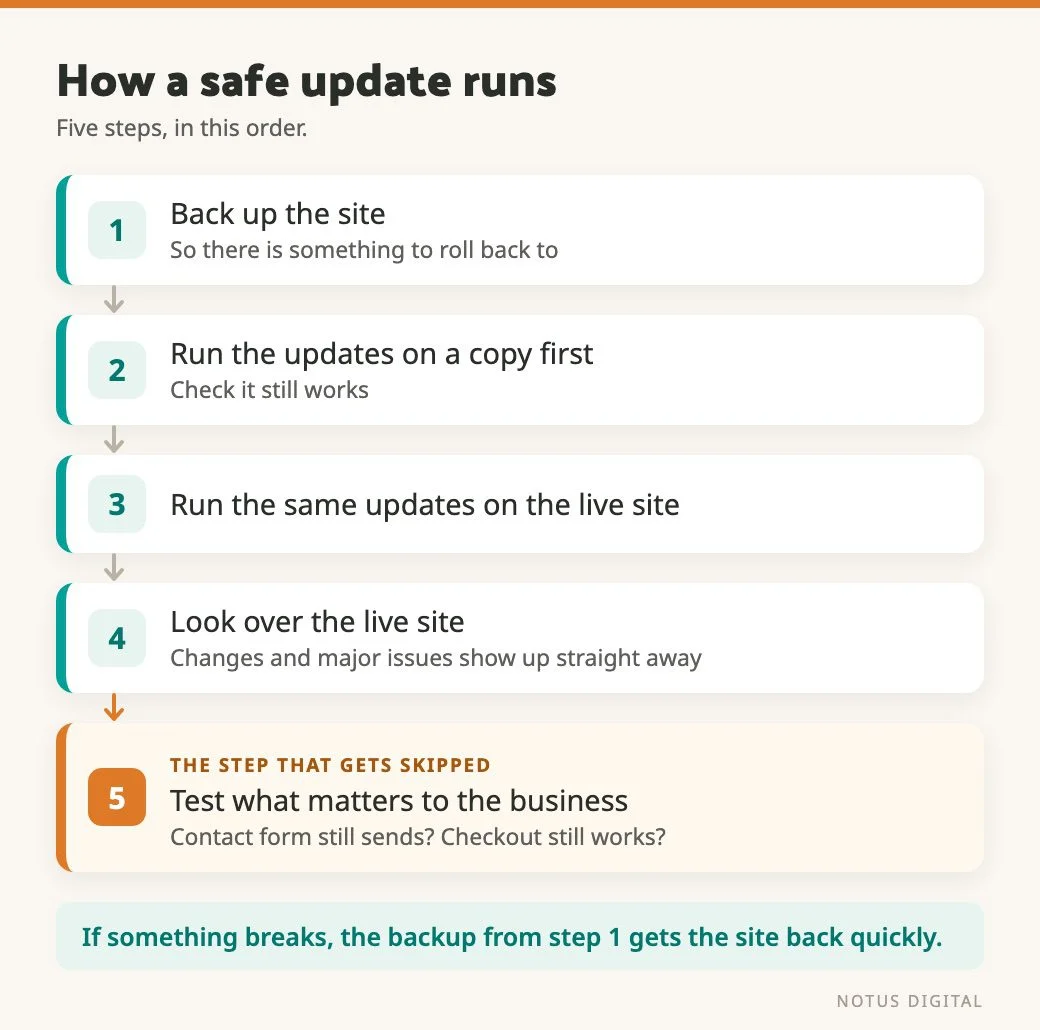
On a care plan, the order is the same every time.
- Take a backup before any big update, so there’s something to roll back to quickly and easily if it goes wrong.
- Where the plan allows, run the updates on a local copy of the site first and check it still works.
- Run the same updates on the live site.
- Look over the live site for changes and major issues, so a problem shows up straight away.
- Test the parts that matter most to the business. If we’ve updated the forms plug-in, we check the contact form still sends. On a shop, we add something to the basket and go through checkout.
That last step is easy to skip. The homepage can look perfect while the checkout behind it has stopped working, and nobody visits their own checkout every morning. Forms can go wrong quietly too. One can stop sending without a single error on screen, which is why we’ve written separately about how to tell if your contact form is really working.
Shops need the most care here. Something like WooCommerce takes longer to update safely, and there’s a lot more to check afterwards.
When old custom code gets in the way
Updates get harder on older sites with a lot of custom code. When we took on the Gentle Recovery members site, it ran BuddyBoss, LearnDash and WooCommerce together. Parts of it were built a long time ago with custom code, and once the plug-ins needed updating to work together, those parts broke.
We rebuilt those parts in a more modern way, using the plug-ins’ own hooks and actions. Those are the points a plug-in leaves open for other code to attach to. Our custom work now sits on top of the plug-in, so a plug-in update doesn’t overwrite it.
If your site has had a lot of custom work done over the years, ask how that work connects to the plug-ins. Custom code that edits a plug-in directly gets wiped or broken by the next update.
Who reads your security scan?
We install a security plug-in on client sites. It scans the site’s files and flags anything that looks wrong.
A scan that finds a problem doesn’t fix it. Someone has to look at what it found and act on it.
On a care plan, that’s part of the job. We see what the scan turns up and fix it quickly, so there’s less damage to deal with. More on the wider picture in our no-nonsense guide to WordPress security.
What happens to sites that never get updated
We’ve seen clients who didn’t have a care plan end up with hacked sites. In those cases the plug-ins had gone a long time without an update.
Cleaning up after a hack costs more than keeping a site updated. How much more depends on how bad the hack is, how much data is on the site, and how much the owner wants to know about what happened. It can take a range of techniques to sort out, and the bill can climb quickly.
Regular updates won’t make a site unhackable. Nothing will. They do mean the site is up to date and much less likely to be hit.
Is a care plan the same as hosting?
Not quite, although on our hosting the line has moved. If we host your site, the hosting now covers WordPress core updates, plug-in updates, backups and security scanning.
Plug-in updates weren’t always part of it. We’ve since built an update process that takes a lot of the routine work out, so they now come with the hosting as standard.
So on sites we host, the bare minimum is already covered. A care plan is for what comes after it. That means extra security on top of the scanning, support when you need a hand, content changes and reporting.
If your site is hosted somewhere else, check what the host actually does. Some hosting only looks after the server, and the updates on the site itself are left to you.
What else a care plan can include
What you get on top of the hosting depends on what you pay. At the simpler end, the work gets done and not much gets sent back. Further up, you get more information about how the site is doing. Things a plan can include:
- Extra security. More protection on top of the scanning that comes with the hosting.
- Content updates. Changes to the text on the site, done for you.
- Support. Someone to ask when something on the site isn’t behaving.
- Performance work. Changes that keep the site running at its best, so it stays quick.
- Simple reports. Google Analytics and Search Console data on how people find and use the site, such as how many arrive from search and how many come direct.
- A list of what was updated. Which plug-ins were updated that month.
- Enquiry information. How many enquiries came through, so a quiet month gets noticed.
- Goal-based extras. Say you want to rank for a particular keyword but you aren’t paying for a full SEO strategy. We can track that keyword and report on it each month. That sort of thing gets agreed in conversation at the start.
What to ask before you sign up
Plans vary so much that comparing them on price alone won’t tell you much. Ask these instead:
- Are updates tested on a copy of the site before they go live?
- Is a backup taken before big updates, and how quickly can you roll back?
- After updates, who checks my forms, and my checkout if I have a shop?
- Who reads the security scan, and what happens when it finds something?
- What’s already covered by my hosting, and what does the plan add on top?
- What do I get back each month, if anything?
- Are content changes included, and how much?
If the answers are vague, ask again. Someone who does this properly can walk you through their last update run.
When to sort it out
At the start, ideally the day the site goes live. We’d much rather be open from day one that any website can be hacked, explain why, and get a plan in place early. The alternative is a phone call after the site has been hacked. Nobody enjoys that one.
If you’re not sure what’s in place on your site right now, get in touch and we’ll tell you what we’d check first.
Questions people ask about website care plans
At the bare minimum, plug-in updates and security checks. If we host your site, those already come with the hosting, along with WordPress core updates and backups. Beyond that it depends on the plan and the price. Plans can add extra security, support, content updates, performance work, simple reports from Google Analytics and Search Console, a list of what was updated and information on enquiries. Some add goal-based extras, such as tracking a keyword you want to rank for.
You can, and WordPress makes it look easy with an “update all” link on the dashboard. The risk is that one plug-in conflicts with another and something breaks. If you do it yourself, take a backup first, and check your forms and checkout afterwards. Having someone look after the site means that gets done carefully, with a backup behind it and, where we can, a test on a copy of the site first.
If a backup was taken before the update, the site can be rolled back quickly and the problem fixed without the pressure of a broken live site. That’s why, on a care plan, we take a backup before big updates and, where the plan allows, test them on a local copy first. Without a backup, fixing it can take a lot longer.
It gets more exposed over time, because the security fixes in each update never reach it. We’ve seen sites without a care plan get hacked after their plug-ins went a long time without updates. Cleaning up after a hack costs more than keeping the site updated, and it can get quite costly.
Not quite. If we host your site, WordPress core updates, plug-in updates, backups and security scanning come with the hosting. A care plan adds things on top, such as extra security, support, content changes and reporting. If someone else hosts your site, ask what their hosting covers, because some only look after the server.