


Why does tracking need to come before the ads?
Because the first few weeks of ad spend are the weeks you most want to learn from. Without conversion tracking, you can see the money going out but not what came back for it, so you can’t tell a campaign that’s working from one that’s quietly eating your budget.
Running ads without it is a bit like handing out flyers all over town and never asking anyone who calls where they heard about you. You’ll get a rough feel for how it’s going and not much more.
It matters to Google too. Bidding strategies like Maximise conversions learn from the conversions you record. Switch one on with no tracking behind it and there’s nothing for it to learn from.
If you’re still deciding between paid ads and organic search, our post on whether to spend on Google Ads or SEO first covers that choice. This one assumes you’ve picked ads and want the money to count.
An online shop we’ve worked with was getting ready to start paid search. Before any budget went out, the ask was to track three things: form fills, phone taps and email clicks. The contact form needed fixing before any of that.
It’s the order we’d suggest to anyone. Get the form working and decide what counts as an enquiry. Then check each one is being recorded before you pay for a single click.
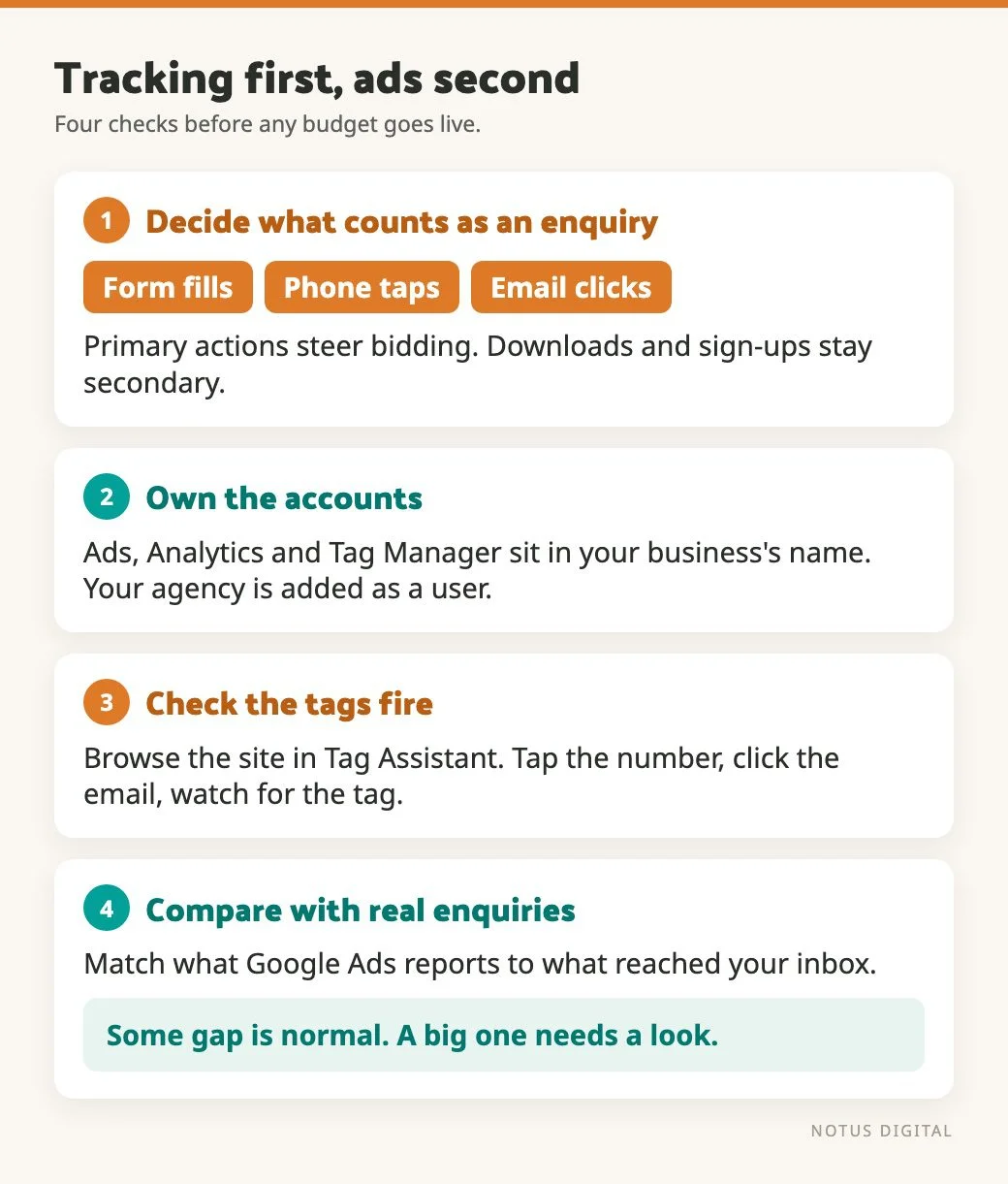
What should count as a conversion?
A conversion is whatever you’d be pleased to see a visitor do. For an online shop that’s mostly a sale, and most shop platforms have a Google app or extension that can send those through once it’s connected. The shop above still wanted its enquiries counted too. For a service business it’s someone getting in touch, and people do that in different ways.
- Form fills. The strongest signal on most sites, because the person has typed out what they want. Track the submission itself, or the thank-you page the form sends people to afterwards.
- Phone taps. On a mobile, tapping your number opens the dialler. That’s worth recording. It just doesn’t prove a call happened. Some people tap, look at the screen and change their mind.
- Email clicks. Clicking your email address opens their mail app. Same story as phone taps: you know they meant to write, not whether they did.
Be choosy about the rest. Count newsletter sign-ups, PDF downloads and video plays alongside enquiries and the totals look great. You learn very little from them.
Google Ads lets you set each conversion action as primary or secondary. Primary actions are the ones Google uses for bidding and for your main conversion figures. Secondary ones are kept for reference. Put real enquiries in the primary group and leave the nice-to-knows as secondary.
How does the tracking get onto the site?
However you go about it, two things have to exist. A piece of Google code on your site, called the Google tag, and a set of conversion actions in your Ads account saying what to count. There are a few common ways to wire the two together.
- Google Tag Manager. A container on your site that holds your tags, so changing what’s tracked doesn’t mean editing the theme. It’s usually the tidiest route for phone taps and email clicks, because Tag Manager can watch for clicks on phone and email links.
- Importing from Google Analytics. If GA4 already records your form submissions as key events, you can link it to Google Ads and import them. Handy if your analytics is already in good shape. Our GA4 basics for non-analysts will help you check that first.
- Adding the Google tag directly. Fine on a simple site, though fiddlier to change later.
For the shop above, we set the tracking up through Tag Manager. Every tag lives in one container, so anyone with access can see what’s being tracked. Adding a new conversion later doesn’t mean touching the site’s code.
One thing to watch whichever route you take. If the same form fill is tracked twice, once by the Ads tag and once as an imported GA4 key event, and both are set as primary, every enquiry gets counted twice. Your cost per enquiry halves overnight. On paper, anyway.
A thank-you page can inflate the count as well. If the conversion action is set to count every conversion, each reload of that page fires the tag again. For enquiries, set it to count one per click.
Who should own the tag and the ads account?
You should. The business, that is, with whoever runs your ads given access to it.
We’ve seen what happens when that isn’t the case. On one site we worked on, the Google tag sat in an agency’s Ads account. After the site moved, nobody involved could find that account or get into it.
Before you start, check:
- The Google Ads account is in your business’s name and you have admin access to it.
- The same goes for Google Analytics and Tag Manager, if you use them.
- Whoever manages your ads is added as a user or linked through their own manager account, so access can be removed cleanly if you ever part ways. Nobody should be logging in with someone else’s details.
- You know which tag IDs your site uses and which accounts they report to. Tag Assistant, mentioned below, will show you the IDs on a page.
If you’re rebuilding or moving the site, write those IDs down beforehand. A move is a common moment for tracking to go missing.
How to check the tracking works
Don’t take a setup screen on trust. A few checks before the budget goes live:
- Open Google’s free Tag Assistant, enter your site’s address and browse it in the window that opens. It shows which tags load on each page and which fire when you do something. Tap your phone number, click your email address and watch for the conversion tag. That shows the tag fired. Whether Google Ads counted it is a separate check, which is the next step.
- In Google Ads, look at the status of each conversion action. A new action usually won’t show as active until a conversion has actually come through, so check back once the first real ones should have landed.
- Once the ads are running, compare the enquiries Google Ads reports with the enquiries that actually came from your ads over the same weeks. Ads only counts people who clicked an ad, so leave out the ones who found you another way. A ‘how did you hear about us?’ question on the form will help you sort them. So will GA4’s traffic source reports, if your form fills are recorded there.
Expect those two numbers to differ. If your site asks visitors for cookie consent, people who decline aren’t tracked in the usual way, so Google Ads will normally show fewer conversions than you really got. Some setups use Google’s consent mode to fill the gap with modelled figures. Treat those as Google’s best guess.
If Ads reports more enquiries than you received, something is being counted twice. If it shows hardly any while people keep telling you they found you through an ad, something isn’t firing.
Make the page worth the click
Good tracking can’t rescue a page that doesn’t persuade anyone. If your ads send people to a page that hides the form below three screens of waffle, you’ll get very accurate figures on a poor result.
Before you switch the ads on, open the page they point to on your phone and read it as a stranger would. Can you tell what’s on offer and how to get in touch without hunting for it? If not, fix the page before you pay to send people to it.
A checklist before you press go
- The contact form works, and enquiries arrive where they should.
- You’ve decided which actions count as enquiries and set those as primary conversions.
- Phone taps and email clicks are tracked, and you remember they show intent rather than a finished call or email.
- The Ads, Analytics and Tag Manager accounts are in your business’s name.
- Tag Assistant shows the phone and email tags firing.
- Nothing is being counted twice.
- You’ve set a date in the first few weeks to compare reported conversions with the enquiries that really came from ads.
If you’d like a second pair of eyes on your tracking before the ads start, or on why the enquiries aren’t coming once they have, have a look at our conversion rate optimisation work and get in touch.
Questions about tracking enquiries from Google Ads
The actions that mean someone wants to do business with you. For most service sites that’s form submissions, taps on your phone number and clicks on your email address. Set real enquiries as primary conversions, and keep softer actions such as downloads as secondary so they don’t steer your bidding.
Track clicks on the phone number links on your site, usually through Google Tag Manager with a trigger for links that start with “tel:”. That records the tap, which shows intent, but it can’t tell you whether a call happened. If you need to know about completed calls, look at Google Ads’ call conversion settings, which can use a forwarding number to count calls that actually connected.
It’s the piece of code that sends information from your site to Google Ads and Google Analytics. It’s managed from the Google Ads or Analytics account it was set up in, so that account should be in your business’s name, with your agency or freelancer given access. Otherwise a change of supplier or a site move can leave you with tracking nobody can get into.
Usually because the same enquiry is being counted by two conversion actions, for example the Google Ads tag and a key event imported from Google Analytics, with both set as primary. A thank-you page that fires the tag every time it’s reloaded can do it too, if the conversion action is set to count every conversion. For enquiries, set it to count one per click. Check your list of conversion actions and keep one primary action per type of enquiry.
Use Google’s free Tag Assistant to browse your site and watch the tags fire as you tap your number and click your email link. For the form, the most useful check is the real one. Once ads are running, compare the conversions Google Ads reports with the enquiries that came from your ads. Expect Ads to show fewer than you really got if your site has a cookie banner.