

What does a charity website need?
Mostly, it needs to make giving easy. Picture someone at a bus stop who has just read your appeal on their phone and decided to donate. Every extra tap between that moment and the thank-you page is another chance for the bus to turn up.
After that, it needs to feel human and caring. We’d steer well away from anything that reads like a corporate annual report. And it needs to be secure, which on a charity site is usually more work than anyone expects.
For the donations themselves, we’d use a well-supported plugin rather than a custom-built system.
Make donating as easy as possible
Donations have to work well, with as little friction as possible. It’s where we’d start on any charity site.
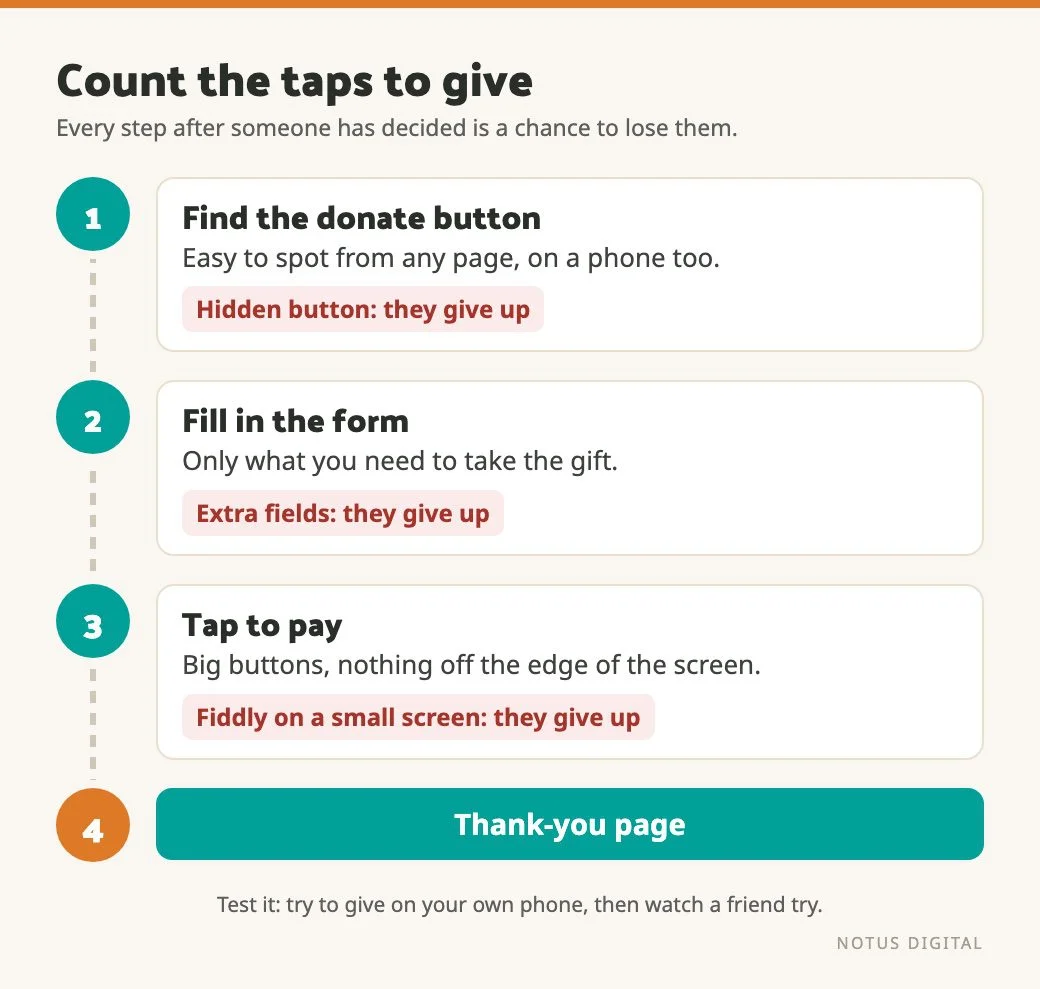
Friction is anything that makes a person stop and think after they’ve already made up their mind. The usual culprits are:
- A donate button they have to go looking for. It should be easy to find from any page, on a phone as well as a laptop.
- A form asking for more than you need to take the gift. Every extra field is one more reason to give up halfway.
- A donation page that’s fiddly on a small screen, with tiny buttons or boxes that sit off the edge.
- Steps that only make sense to the people who built them.
The best test costs nothing. Open your site on your phone, pretend you’ve just decided to give, and count the taps. Then hand the phone to a friend who has never seen the site and watch where they hesitate. It can be a slightly painful watch. It’ll still tell you more than any report.
Once the gift has gone through, say thank you properly. The thank-you page and the confirmation email should tell someone straight away that their gift went through and how much it was for. Then tell them, in plain words, what their money helps you do. It’s also a natural moment to ask whether they’d like to hear how the appeal goes.
Show the real people behind the charity
A charity site should feel like it was made by people who care. When it gets too polished and corporate, visitors start to feel they’re dealing with an institution rather than a cause.
Showing real people is always a good move. Your volunteers, your staff, your supporters at an event, and the people you help where they’re happy to be shown (always ask first, and take extra care with anyone vulnerable). We’d take a slightly blurry photo of your actual volunteers over a glossy stock image of hands holding a seedling.
The words matter as much as the photos. Write the way your team would talk to a supporter over a cup of tea at a fundraiser, warm and plain. If a sentence could sit on any charity’s site unchanged, it probably isn’t saying much about yours.
Why we’d use a donation plugin
On a WordPress site, our recommendation for taking donations is a dedicated donation plugin. The one we rate is GiveWP, which is built for WordPress and, in our experience, does pretty much everything a charity site needs from its donations.
We’d go that way for two reasons.
First, a donation plugin is set up around what charities want, because that’s the whole point of it. Nobody has to work out from scratch what a donation form should do, so you aren’t paying a developer to reinvent it.
Second, it keeps getting updated. Security holes in plugins are found and patched all the time. A plugin with a team behind it keeps up, and your site picks up those fixes each time it’s updated.
A custom-built donation system can work. But it tends to be quite narrow. It does what it was built to do on the day it launched, and every change after that is another job for a developer. It also needs frequent updating, and if nobody is booked to do that, it slowly falls behind.
Whichever plugin you look at, check its current features against your own list before you commit. Some questions worth asking:
- Can supporters give monthly as well as one-off?
- Does it handle Gift Aid declarations the way you need?
- Does it work with the payment provider you already use?
- Can your finance team get the reports they need out of it without asking a developer?
If your site was built a long time ago
Security on a charity site is a lot of work. On an older site it starts with some detective work.
If a site was built years ago, you first have to find out how it was put together before you can safely change anything. Which theme it runs, which plugins, what custom code is in there and who wrote it. Where the donations actually go, and how they get there. Until you know that, changing one part can break another part nobody realised was connected.
So with an older site, we look under the bonnet before we add anything. That usually means:
- Listing every plugin and checking when each was last updated, and whether it’s still maintained at all.
- Finding any custom code, especially anything that touches payments or supporters’ details.
- Checking who has admin access, and removing anyone who no longer needs it.
- Taking a full backup before any changes are made.
Only then does it make sense to plan the improvements. Our no-nonsense guide to WordPress security covers the wider basics.
Keeping it secure after launch
Any website can be hacked, and every plugin left out of date is one more way in. A site that takes donations has more reason than most to stay current.
Updates should be done carefully. Back up first, update, then check the parts that matter. On a charity site that means running through the donation form itself, not only glancing at the homepage. A donate button that quietly stopped working after an update is the kind of fault nobody spots until the money stops coming in.
If nobody in your team has the time for that, it’s what a care plan is for. We’ve written up what regular WordPress maintenance involves, so you know what to ask for.
Make it usable for everyone
Your supporters, and the people you help, won’t all use a website the same way. Plenty of people use a screen reader or zoom the page right in, and some get around with a keyboard and no mouse at all. A charity site that shuts any of them out is working against its own purpose.
The Web Content Accessibility Guidelines (WCAG), published by the W3C, are the standard most accessibility checks work from. We aren’t lawyers, so we won’t tell you which legal duties apply to your charity. If you’re unsure, take proper advice.
Whatever the legal position, a few basics go a long way:
- Text that contrasts clearly with its background.
- Alt text on your photos, especially the ones of real people doing real things.
- A donation form with clearly labelled fields that works with a keyboard alone.
- Links and buttons that say where they go, rather than “click here”.
There’s more on this in our post on why website accessibility matters and where to start.
Where to start
If you only do a few things this month, do them in this order:
- Try to donate on your own phone, then watch someone else try. Fix whatever makes them hesitate.
- Look at your photos and your words. Swap stock images for real people wherever you can.
- Find out how your site is built and who looks after the donation side. If the answer is “nobody’s sure”, start there.
- Check your plugins are up to date and that someone is responsible for keeping them that way.
- Run through the accessibility basics above.
None of it needs a new website on day one. Often the biggest win is making the giving part easier and making sure someone keeps an eye on the rest.
Questions charities ask about their websites
Make it as easy as possible: a donate button that’s easy to find from any page, a short form that works well on a phone, and nothing asked for that you don’t need. On a WordPress site we’d use a dedicated donation plugin rather than building something from scratch.
We recommend a plugin. A donation plugin is set up for what charities need and keeps getting updated by the team behind it. A custom-built system tends to be narrow, every change becomes a developer job, and it needs frequent updating to stay secure.
GiveWP is a donation plugin for WordPress. It’s the one we rate for charity sites, because in our experience it covers pretty much everything a charity needs from its donations. Check its current features against your own list, such as monthly giving and Gift Aid, before you commit.
The Web Content Accessibility Guidelines (WCAG), published by the W3C, are the standard most accessibility checks work from. We can’t tell you which legal duties apply to your charity, so take advice if you’re unsure. Clear contrast, alt text, labelled form fields and a donation form that works with a keyboard are good places to start.
Find out how it was built before changing anything: which plugins it runs and when they were last updated, any custom code that touches payments, who has admin access, and where the donations actually go. Take a full backup, then plan the improvements.