


What is an internal linking strategy?
An internal link is a link from one page on your site to another page on the same site. An internal linking strategy is the decision about which pages get linked to, from where, and with what wording.
Most sites have internal links by accident. A menu, a footer, and whatever got dropped in over the years. A strategy makes it deliberate: you pick the pages that matter commercially, then make sure the rest of the site points at them in a way readers and search engines can both follow.
That is the whole idea. The rest of this post is how to do it in an afternoon rather than turning it into a six month project.
Why internal links matter
Internal links are how search engines discover your pages, how they work out the relationships between them, and how authority moves around your site.
External backlinks get most of the attention because they are harder to earn. But internal links are entirely under your control, and they are often quicker to pay off. A well-linked page can outrank a poorly-linked one even when the second has more words on it and more external authority behind it.
What internal links actually do for SEO
Three jobs:
- Discovery. Google finds new pages by following links. Pages with nothing pointing at them are “orphan pages” and rarely get crawled.
- Authority distribution. When one of your pages earns external backlinks, that authority flows out through internal links to other pages. Your internal linking decides which pages benefit.
- Context. The anchor text and the sentence around it help Google work out what the linked page is about.
Get all three right and every page on your site gets a small but real lift.
Start with your most valuable pages
Before you add a single link, decide which pages matter most. Usually:
- Your main service or product pages
- Cornerstone blog posts that bring in traffic
- High-converting landing pages
- Pages targeting your most valuable keywords
These are your money pages. The goal is to make sure they are well supported by links from across the rest of the site. We covered how to work out those priorities in how keyword research transforms strategy.
The hub-and-spoke model
The most useful structure for a small business site is hub-and-spoke, sometimes called a topic cluster. You pick a topic, write one broad “pillar” page, then write smaller “spoke” pages that go deep on subtopics. Every spoke links to the pillar, and the pillar links back out to the spokes.
The result is a clearly defined topic on your site with strong internal connections, which is a much stronger signal than the same pages sitting there unconnected.
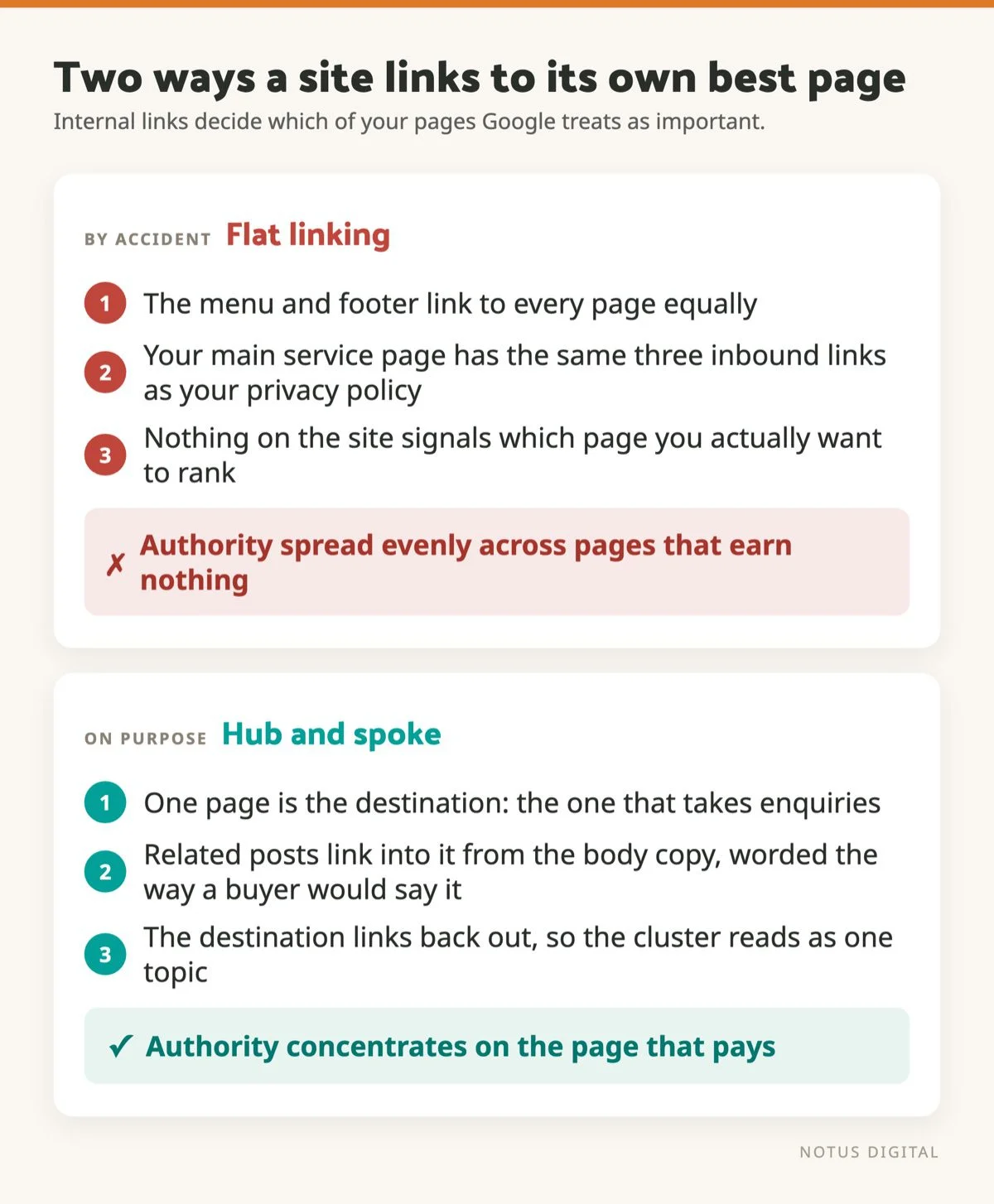
We run this on the Notus blog. The pillar post on CRO for small businesses connects to spokes like heatmaps and session recordings and how to build landing pages that convert.
How this works for a local service business
The theory is easy to read and hard to picture, so here is the version we run on our own site.
Our commercial pages are the location pages, one per town we work in. Those are the pages that need to rank and take enquiries. They are also the pages nobody ever links to naturally, because nobody writes a blog post about someone else’s service page.
So each one gets a supporting post. Questions to ask before choosing a web designer in Chichester is written for someone still making up their mind, and it links into our Chichester web design page using the words a buyer would actually use. Local SEO for Portsmouth businesses does the same job for Portsmouth.
The split is the important part. The post answers a question. The location page asks for the enquiry. Keeping those on separate pages stops the two competing for the same search, which is the mistake most local sites make the moment they write a second page about the same town.
Anchor text: the part most people get wrong
The clickable text tells Google what the destination is about. The common mistake is generic anchors like “click here”, “this post” or “read more”. They tell Google nothing.
Better practice:
- Use descriptive anchors that include or paraphrase the target page’s main topic.
- Vary your anchors between links. If every link to a page uses identical wording, it reads as engineered.
- Match the surrounding context. The sentence around the link should support what the link is about.
- Do not keyword stuff. If every internal link is an exact-match keyword, Google notices.
The phrase you put between the <a> tags is doing real SEO work. Treat it like the title of the page you are linking to.
Where to actually add internal links
Within blog post body content
The highest-value place. Links inside natural prose, supporting what you are saying, are the most useful for readers and for Google. Aim for five to a dozen internal links in a long-form post.
From new posts to old posts
Every new post is a chance to point at your existing money pages. Make it a habit: every time you publish, ask which existing pages this new piece should link to.
From old posts to new posts
Less obvious and just as valuable. After publishing, go back and add links to the new post from at least three older posts on related topics. Most people skip this, and it works.
Between service pages and blog posts
Connect the commercial pages to the educational content in both directions. Someone on a service page might want background. Someone on a blog post might be ready to enquire. Make both journeys easy.
From the homepage
The homepage is usually your highest-authority page. Linking from it to your main service pages, recent posts and key landing pages passes that authority to where it matters.
Common internal linking mistakes
- Orphan pages. Pages with nothing pointing at them. Search “orphan pages” in your SEO tool of choice and fix what you find.
- Burying important pages five clicks deep. Anything more than three clicks from the homepage is in trouble.
- Linking to the same page from one post twenty times. Once is enough. The first link is the one Google counts.
- Generic “read more” anchors. Replace them with descriptive ones.
- Auto-generated link blocks in the footer. Footers stuffed with city names look spammy, and they are the reason a lot of local sites get nowhere.
- Broken internal links. Audit them once or twice a year and fix anything pointing at a 404.
For a wider checklist, see how to conduct a website audit.
What internal linking will not fix
Internal links move authority around your site. They do not create it. If a site has very little authority to begin with, redistributing it more sensibly lifts pages a few positions, not thirty.
That matters for expectations. On a site with a reasonable link profile, fixing the internal structure can be the difference between position 12 and position 6, which is most of the clicks. On a new site with no external links at all, the same work mainly helps Google find and index your pages quickly. Worth having, but a different win. Where competitors are far ahead on authority, better internal linking narrows the gap rather than closing it, and the other half of that job is covered in what domain authority is and how you improve it.
How many internal links is too many?
Google’s position is that a reasonable number of links per page is fine. Reasonable usually means somewhere between five and a hundred depending on the page. A long-form post with twenty internal links is fine. A page with two hundred links out starts to look like a link farm.
A practical rule: every link should be there because it genuinely helps the reader. If you could delete it without losing anything, it does not belong.
Tools that make internal linking easier
- Rank Math or Yoast. Both suggest internal links inside the editor as you write.
- SEO crawlers like Screaming Frog will find orphan pages and broken internal links across the whole site.
- Link Whisper. A WordPress plugin that surfaces link opportunities while you write.
- Google Search Console. The Links report shows internal link counts per page, so you can spot the under-linked ones.
A simple internal linking workflow
- List your top 10 money pages.
- For each one, count how many internal links currently point at it.
- For the under-linked pages, find five existing posts where a link would sit naturally.
- Add the links with descriptive anchor text.
- Wait four to eight weeks, then check Search Console for ranking changes.
This is one of the cheapest, most reliable SEO wins available. No new content, no new tools, no technical work. An hour or two of editing.
If you would like a hand auditing your internal linking, drop us a line. It is one of the first things we look at on any new SEO engagement.
If terms like anchor text or crawl budget are new to you, our SEO jargon buster gives you the plain English meaning of each.
Frequently asked questions
An internal link is a link from one page on your website to another page on the same website. It is different from a backlink, which comes from a separate site. Internal links help search engines discover your pages, understand how they relate to each other, and pass authority between them.
There is no fixed limit. Google says a reasonable number is fine, which in practice means roughly five to a hundred depending on the page. A long-form blog post with ten or twenty internal links is normal. The useful test is whether each link genuinely helps the reader, not whether you have hit a number.
Yes, though within limits. Internal links move existing authority around your site and tell Google which pages you treat as important, so a better-linked page can outrank a poorly-linked one. What they cannot do is create authority that is not there. On a site with very few external links, better internal linking mostly speeds up discovery and indexing.
Use wording that describes the page you are linking to, in the language a reader would use. Avoid “click here” and “read more”, which tell search engines nothing. Vary the wording between links to the same page rather than repeating one exact phrase, and keep the surrounding sentence relevant to the link.
Usually four to eight weeks. Google needs to recrawl the pages carrying the new links before the effect shows up, and ranking changes then take a little longer to settle. Add the links, note the date, and check Search Console positions for the target pages after a couple of months.