

How do you move a membership site safely?
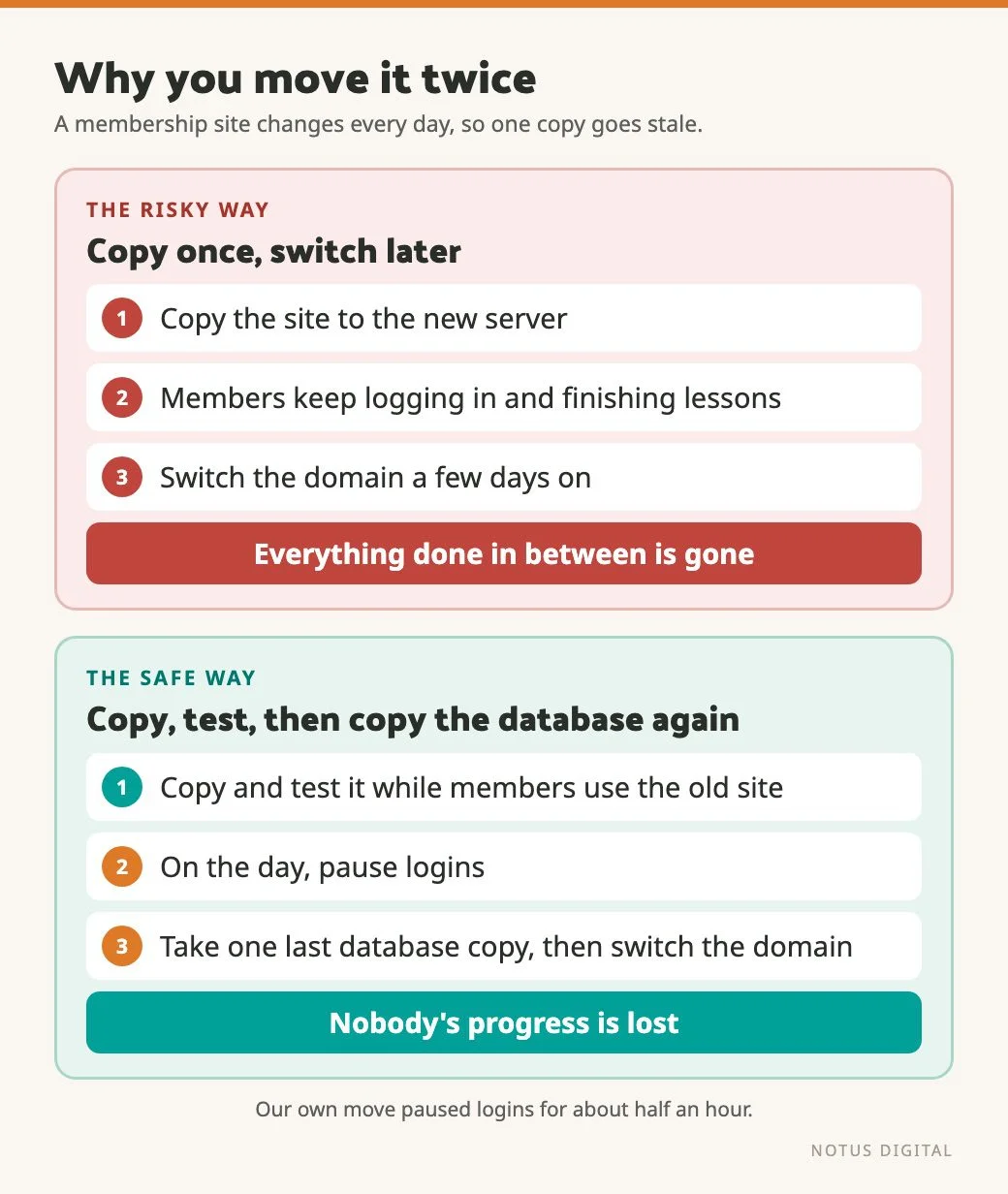
You move it twice. First you copy the full site to the new server, check it works and fix anything that doesn’t, while members carry on using the old one as normal. Then, on the day, you pause logins, take one fresh copy of the database and any files members have uploaded, then switch the domain over.
The reason for the double move is that a membership website never sits still. A brochure site can be copied on Monday and switched on Wednesday, and very little will have changed in between. On a membership site, people log in, finish lessons, post in the community and renew in that gap. Copy it once and switch it days later, and everything they did in between is gone. (Members tend to notice when their progress vanishes.)
The Gentle Recovery move
Gentle Recovery came to us with a members platform that doesn’t rely on a single WordPress membership plugin. It’s three plugins working together: BuddyBoss for the community, LearnDash for the courses and WooCommerce for the payments and subscriptions. Their previous developer could no longer work with them, so the site needed a new home on our hosting, with every member coming across properly.
The members area also changed address as part of the move. It used to sit in a folder on the main site, at /members/, and it now lives on its own members subdomain. It’s a tidier setup, and it keeps the members’ analytics a bit more separate from the public site’s. The public site kept all of its URLs. We set up redirects from the old /members/ addresses to the new ones, checked the URLs afterwards, and made sure the consent banner covers the subdomain too.
What to ask for before you start
Before we touch anything on a move like this, we ask for:
- The domain and hosting details, so we know where everything lives and who controls it.
- Access to the website itself, to see how it has been put together.
- Hosting and login access, so we can see the code.
- A handover from the last developer, if that’s possible.
The handover is worth more than people expect. Gentle Recovery’s previous developer was very helpful here. They gave us the background on the site and the historic issues they’d been working through, which meant we could fix things much faster than if we’d been piecing it together ourselves.
If you own the site, gathering those details is the part only you can do, so start on it before you ask anyone to quote for the move.
The order we moved it in
- Set up the new server.
- Take a full backup of the current site and restore it on the new server.
- Check everything works on the new server before changing any DNS (your developer can view it through a temporary address), and make the small tweaks it needs.
- On the day, put a notice on the old site that stops members logging in while the move happens.
- Take one last export of the database, with every user and everything they’ve been doing, and copy across any files members have uploaded since the first copy. Bring it all in on the new server.
- Switch the DNS so the domain points at the new server.
Steps two and three take most of the time. Members never see them.
Watch the tweaks in step three. The final import replaces the new server’s database, so any change saved in it gets wiped. We made ours in the site’s code and settings files, which the final import doesn’t touch, and redid anything stored in the database after the last import.
One tip for step six. DNS records carry a setting called TTL, which tells other servers how long to remember the old address. Ask whoever manages your domain to shorten it well ahead of the move, at least one current TTL before the day, and the switch tends to reach everyone faster.
For Gentle Recovery, the day itself went smoothly. Once the DNS switched, the site loaded from the new server and everything worked.
Picking the quietest half hour
“We’re pausing logins” sounds more dramatic than it is. Ours lasted about half an hour, during the day.
We didn’t pick the time by guessing. We looked at when members actually logged in and chose the quietest window we could find. The notice on the old site is there for anyone who does turn up during that window, so they see what’s going on rather than an error page.
It’s good manners to email members a few days ahead with the date, the time and roughly how long it should take.
Fixing the old problems along the way
A move is a good moment to look under the bonnet. This site had been built a long time ago.
There were historic issues to work through, several of which the previous developer had already told us about, and we’ve kept fixing things as they come up since. The bigger job was the plugins. They were dated and needed updating so they’d work together properly again. Updating them broke things, because of the old custom code in the site.
Rather than patch that code, we rebuilt those parts in a more modern way. Plugins like LearnDash and BuddyBoss offer hooks, which are points where other code is allowed to join in. Our custom work now sits on top of the plugins through those hooks, so the plugin code itself is never edited. A plugin update no longer wipes out the custom work.
That matters long after the move, because regular updates are a big part of keeping a site like this healthy. Our guide to WordPress maintenance covers what that looks like.
Making locked course modules look locked
One fix was about the members’ experience more than the plumbing. The course has 12 modules, taken in order, and you shouldn’t be able to start the next one until you’ve finished the one before.
That rule worked. But future modules could still be clicked, and clicking one landed you on a “you can’t access this” page. Not much fun when you’re just trying to get on with your course.
We changed it so locked modules look visibly locked and can’t be clicked at all. The rule underneath stayed the same, and the change was built through the plugin’s own hooks, so it survives updates too.
What to test around the switch
Testing a membership site has one trap in it. A logged-out check of the homepage proves very little, because a members site often sends logged-out visitors straight to the login page, and that page will load perfectly well even if everything behind it is broken. So test as a member would, on the new server before the switch and again straight after it.
- A member can log in. If login breaks, every member is locked out at once.
- A logged-in member can reach a course and the lessons display properly.
- The checkout shows the right price and billing term, matching your join page.
- Renewals aren’t on hold. WooCommerce Subscriptions notices when the site’s address changes and can pause automatic renewals until someone confirms the move. We got its “site has moved” notice on the Gentle Recovery move, so look for it in the admin.
- Stripe’s webhooks point at the new address. Change them at the switch, not days before, or Stripe will be updating a copy of the site that is about to be replaced. Webhooks are how Stripe tells the site a payment has gone through. Once the members area moved to its subdomain, every one of Gentle Recovery’s webhook addresses needed changing.
- Password resets, receipts and renewal reminders still send.
- Redirects take people from any old addresses to the right new ones.
Why a busy membership site needs its own server
One lesson we’d pass on to anyone running a shop or members site with lots of people on it at once, doing fairly complex things: where the budget allows, it should be on its own VPS. That’s a virtual private server, where the site gets resources set aside for it rather than sharing them with lots of other sites.
It isn’t sharing a server with other people’s sites, which is safer. And the memory and processing power are all its own, so pages load faster. A members site needs that headroom. Logged-in pages usually skip page caching, because each one is built fresh for the person viewing it, so they lean on the server much harder than a brochure page does. For more on the security side, see our no-nonsense guide to WordPress security.
Planning your own move
Start with the access list above and a look at when your members log in. If the site has passed through several developers over the years, expect some untangling.
If the public side of the site is changing at the same time, with a new design or new page addresses, our guide to planning a redesign without losing your SEO covers that part. And if you’d like a hand moving your membership site, get in touch.
Questions about moving a membership site
Usually, yes, as long as the whole database moves across and you keep the same payment provider account. With a provider such as Stripe, the card details are held by the provider, and your site only keeps a reference to them. If you use WooCommerce Subscriptions, look for its notice about the site address changing after the move, so automatic renewals carry on.
Test as a member, not as a logged-out visitor, on the new server before the switch and again straight after. Check that a member can log in, reach a course and see the lessons, that the checkout shows the right price and billing term, and that emails such as password resets and receipts still send. If you take payments through Stripe, repoint its webhooks at the new address at the switch itself, and if any addresses changed, check the redirects too.
On the Gentle Recovery move, about half an hour. The pause only needs to cover the final copy of the database and members’ uploads, plus the DNS switch, because everything else is done beforehand. Some people’s devices will keep finding the old server for a while after the switch, so leave the notice up on the old site until the DNS has caught up. Pick the time from your own login data, so it lands in your quietest window.
Tell them the date, the time and roughly how long logins will be paused. A notice on the site during the pause helps anyone who turns up anyway, so they see what’s happening rather than an error.
A handover if they can give one: the background on the site, any custom code and the issues they’ve been dealing with. Alongside that, make sure you have the domain and hosting details, access to the website, and hosting access so the new developer can see the code. A good handover gets problems fixed faster.